
Space Launch Now - Tracker
Caleb JonesNews & Magazines
4.82.52K Reviews
- Version
- Varies With Device
- Installs
- 100.00K
- Age Rating
- Everyone
Screenshots
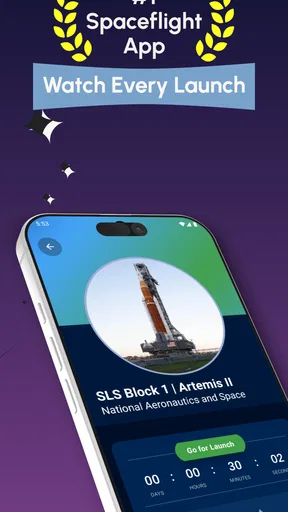
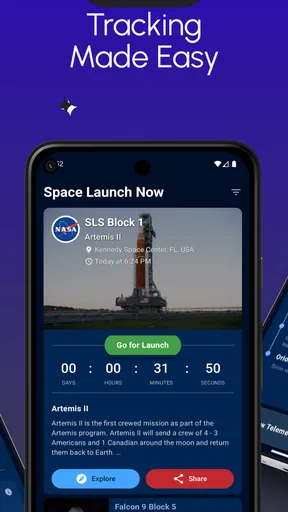
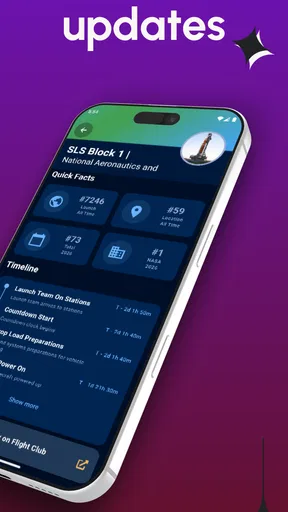
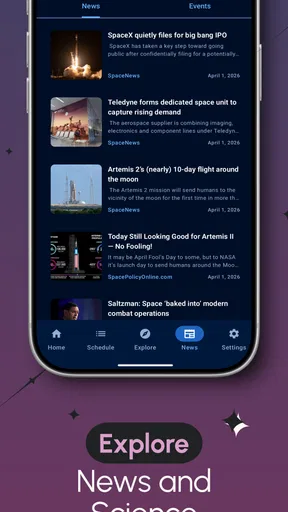
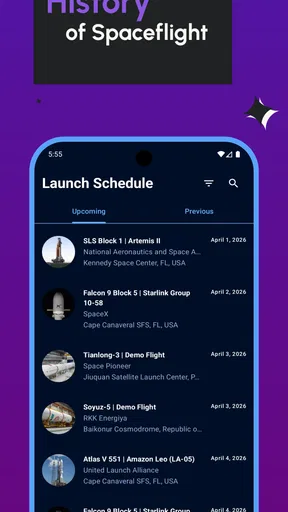
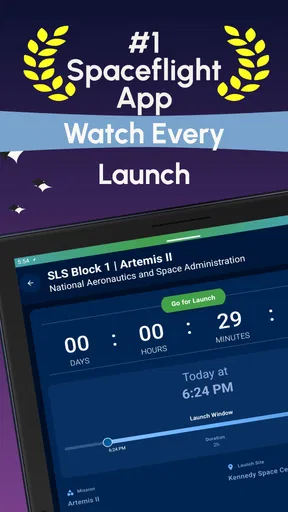
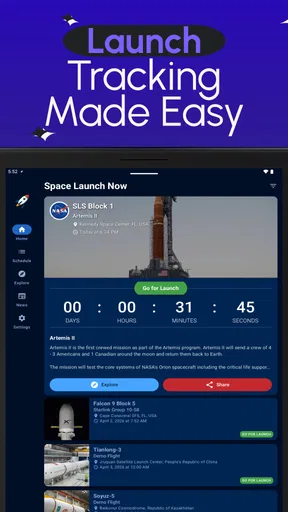
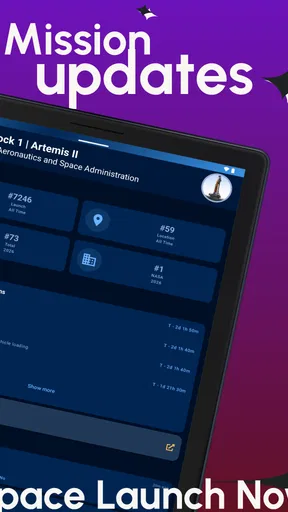
Our Review of Space Launch Now - Tracker
 Analysis by Appyee
I found Space Launch Now - Tracker most useful when I wanted a calmer, more focused way to follow spaceflight than jumping between agency pages, social feeds, and general news apps. It is a free news and magazines app from Caleb Jones, built around launch schedules, countdowns, live tracking, and alerts. After spending time with it, my impression is that it works best as a dedicated launch companion rather than a complete space-news replacement.
The appeal is easy to understand. Instead of asking me to remember which organization is handling a mission, the app brings launches from SpaceX, NASA, ISRO, and ESA into one viewing experience. That makes it practical for casual observers, students, families, and space enthusiasts who want a timely reminder without turning every launch into a research project. It has reached over 100 thousand installs, carries a 4.8 average from around 14 thousand ratings, and is available free for everyone.
How clearly the app presents launch information
I find the app easiest to judge by how it handles launch information: it gives me a place to check the schedule and countdowns without having to piece together a timeline from several sources. In this section, I’ll focus on what that presentation makes easier—and where a quick overview still calls for a closer look.
A focused home for countdowns and mission context
The strongest part of the experience is its narrow purpose. A general news app may show a headline about a launch, but that headline quickly gets buried among politics, sports, business, and entertainment. Here, the subject is much clearer: upcoming and active space launches. I can open the app with a specific question in mind—what is launching next, how soon is it happening, and which organization is responsible—and the structure is designed around that question.
That focus also helps readability. Launch information can become confusing when a mission has a vehicle name, a payload name, an agency, a launch site, and several schedule changes. A dedicated tracker gives those details a natural home instead of scattering them across unrelated articles. I found that especially helpful when comparing missions from different providers, because the app encourages me to think in terms of a timeline rather than a stream of disconnected announcements.
The countdown format is useful for quick checks. I do not need to read a long article to understand whether a launch is imminent or still several days away. For someone with limited time, that is a meaningful advantage over browsing a space-news website. It also makes the app suitable for a shared household routine: one person can check the next event, then decide whether it is worth setting aside time to watch.
Navigation that suits different reading habits
I appreciate that this is not an app I need to study before using. Its purpose is apparent quickly, and the information is organized around events rather than a complicated collection of menus. That matters for people who are new to spaceflight. A beginner may not know the difference between a launch provider, a rocket, and a payload, but they can still understand a schedule and follow a countdown.
For experienced followers, the same simplicity can feel refreshing. I often prefer a quick launch overview to a long article when I am checking my phone between tasks. The app is better at answering “what is happening next?” than at replacing detailed mission research, and that division of labor makes sense. I can use it for orientation, then move elsewhere when I want technical background or extensive reporting.
Text-heavy screens are generally easier to scan when they use clear labels and sensible grouping. In practice, I would still recommend increasing the device’s system text size if small writing is uncomfortable. That is not a special feature claim about the app; it is simply a useful habit for any information-dense mobile interface. Larger system text can improve comfort, although it may also make some screens require more scrolling.
Useful distinctions for people who follow several agencies
One non-obvious strength is the way a single tracker changes the mental workload of following international launches. If I only follow one provider, a provider-specific source may be enough. If I follow SpaceX while also keeping an eye on NASA, ISRO, and ESA, checking multiple official calendars can become repetitive. Space Launch Now - Tracker gives me one starting point for that wider view.
That does not mean every user should abandon official sources. For critical details, schedule changes, technical explanations, and mission-specific instructions, I would still verify information with the relevant agency or provider. The tracker is most valuable as an alert and discovery layer. It tells me where to look and when to pay attention; it is not the only source I would trust for every detail.
Reading comfort beyond visual clarity
The app’s subject matter also affects accessibility in a positive way. A launch tracker can be consumed in short visits, so I am not forced to remember a long article or navigate a complex archive. Someone with attention limitations may benefit from checking one event at a time. Someone learning English or learning about spaceflight can use the launch context as a manageable way to build familiarity with the vocabulary.
There is a trade-off, though. Spaceflight names are naturally dense, and several missions may look similar at a glance. A reader who relies heavily on visual distinction may need to slow down and confirm the mission name, provider, and timing rather than acting on the first line they see. I would treat the countdown as a prompt to verify, not as a reason to rush.
Motor and sensory considerations during everyday use
A tracker is generally less demanding than a game or a creative tool because the main task is reading and selecting information. I do not need rapid taps or precise gestures to understand a launch schedule. That makes it a reasonable choice for users who find fast interaction tiring or difficult. The workflow is also compatible with brief one-handed checks, such as looking at the next launch while standing in a queue.
Alerts can be helpful for people who do not want to repeatedly open the app, but notifications are also where personal preferences matter most. A sudden sound or vibration can be distracting in a classroom, workplace, medical setting, or shared home. I would configure the phone’s notification behavior to match the situation instead of allowing every reminder to interrupt the day. The best alert is one that helps me remember a launch without creating a new source of stress.
For sensory-sensitive users, a quieter notification setup may be preferable to frequent attention-grabbing signals. I would use visual reminders or a restrained notification style when possible, especially if I am following several missions. The app’s value comes from timely information, not from making every update feel urgent.
People with limited dexterity may also appreciate the app’s basic use case: open it, read the next event, and leave. The more advanced the browsing session becomes, the more navigation effort may be involved. If I am comparing several launches or opening multiple detail views, I need more sustained interaction than I do for a simple countdown check. That distinction is important when deciding whether the app fits a particular routine.
Using the app in shared and changing environments
One realistic scenario is a family preparing to watch a launch together. I can check the schedule earlier in the day, use the countdown to judge whether the timing is realistic, and set a reminder so nobody has to keep searching for updates. A child who is curious about rockets can open the same app and see that missions are organized events rather than random clips appearing in a video feed. An adult can then add context from an official source or a documentary.
Another scenario is a student using the app as a starting point for a project. The tracker can help identify a mission and its general timing, while the student researches the science, destination, payload, or agency separately. That workflow is more reliable than copying a short notification into an assignment because it encourages the learner to distinguish a schedule tool from a reference source.
It can also support a busy adult who follows launches as a hobby. I might have only a minute during a commute or lunch break, so a concise event view is more practical than reading a full news report. Later, if a launch interests me, I can spend more time with detailed coverage. This two-stage approach—quick awareness first, deeper reading later—is where the app fits naturally.
What happens when conditions are less convenient
Situational access is not only about disability. Bright sunlight, poor connectivity, background noise, low battery, and divided attention can all change whether an app is comfortable to use. A countdown is useful at home, but I may not want to depend on a live check while traveling or when my phone is nearly out of power. For an important viewing plan, I would check the schedule ahead of time and keep an official source available as a backup.
Notifications are similarly context-dependent. An alert that is welcome at home may be inappropriate during work or sleep. I would rather receive a carefully chosen reminder than treat every update as equally important. This is a small but significant workflow improvement: decide when the app should interrupt me before a launch day arrives.
The app’s free price makes that experimentation easy. I can try it without paying at the start, which lowers the barrier for occasional users and families. There are optional in-app purchases ranging from under a dollar to around fifty dollars per item, so I would pay attention to the purchase screen and only buy something if I understood exactly what it added to my experience. A free entry point is convenient, but optional spending should still be considered carefully by parents and anyone managing a tight budget.
Where the experience may still create barriers
The clearest limitation is that a launch tracker cannot remove the complexity of its subject. Spaceflight schedules change, mission titles can be unfamiliar, and a countdown may create an expectation of certainty even when plans move. A user who needs highly predictable timing may find the format frustrating. I would treat the displayed schedule as current planning information rather than a promise that an event will happen at that exact moment.
Another barrier is the difference between concise tracking and full explanation. A person who needs background context may find a countdown insufficient. If I want to understand why a launch matters, what a payload does, or how a vehicle works, I need another source. That is not a failure of the tracker, but it does mean the app is less suitable for someone seeking a complete educational news experience in one place.
Users who prefer audio-first information may also find a launch-focused visual interface less convenient than a podcast or spoken news briefing. Likewise, readers who need extensive customization of presentation should test the app with their own device settings and habits. I would not assume that a simple layout automatically meets every accessibility need. The practical question is whether the text, controls, alerts, and pacing work comfortably on the particular phone and in the particular environment.
There is also a potential attention cost. Because the app is built around upcoming events and alerts, it can encourage repeated checking. For a dedicated enthusiast, that is part of the fun. For someone trying to limit notifications or screen time, it may be better to use it only around launches and disable reminders afterward. The app supports a focused hobby, but it should not quietly become another stream demanding attention all day.
How it compares with usual alternatives
Compared with a general news app, Space Launch Now - Tracker is more focused and less cluttered for launch awareness. A news app is better when I want politics, science reporting, analysis, and breaking stories together. The tracker is better when the immediate question is timing and launch activity.
Compared with following individual agencies, it is more convenient for a mixed international schedule. Official sources remain preferable for authoritative mission details, but checking several calendars separately takes more effort. The tracker provides a useful overview, especially for people who do not want to build their own system of bookmarks and reminders.
Compared with a social-media feed, it is less dependent on whatever happens to be trending. Social platforms can provide live reactions and community discussion, but they can also mix speculation, old posts, and unrelated content into the same stream. I prefer the tracker when I need a clean starting point, then use social or news sources only if I want conversation and analysis.
Compared with a video platform, it is better for planning and worse for watching. A video app may offer launch broadcasts, replays, and explainers, while this app is centered on tracking the event. If my main goal is to watch footage, I would choose a video source. If my main goal is to know when to watch, the tracker makes more sense.
Who will benefit most from it
I would recommend it to casual space fans who want one dependable place to check upcoming launches, as well as enthusiasts who follow several agencies. It is also a sensible companion for families, teachers, and students who need a simple visual entry point into spaceflight. The Everyone age rating makes it approachable for a broad audience, although younger children may still need an adult to explain the terminology and help judge schedule changes.
It is less suitable for someone who wants long-form journalism, detailed technical education, or a single app that combines launch tracking with a full archive of space reporting. I would also hesitate to recommend it as the only source for a high-stakes viewing plan. Use it to organize attention, then confirm important changes through the relevant official channel.
Caleb Jones has kept the concept clear enough that the app does not feel like a general-purpose news reader wearing a space theme. That clarity is its main advantage. The trade-off is that users looking for broader coverage may outgrow it quickly and need a second app or website.
My inclusive verdict after using it
Space Launch Now - Tracker succeeds because it reduces the work of staying aware of launches without pretending to be every kind of space resource. Its countdown-centered approach is easy to understand, useful in short sessions, and adaptable to different routines when notifications and device settings are adjusted thoughtfully.
From an inclusion perspective, I see a practical benefit in its focused workflow: fewer unrelated stories, no need for rapid interaction, and a clear reason to open the app. That can help people with limited time, limited attention, or difficulty navigating crowded news services. At the same time, accessibility depends on the individual device and user. Text size, notification behavior, sensory comfort, and the need for deeper explanations can all change the experience.
My advice is to start with the free version, follow only the launches that genuinely matter to you, and configure alerts before relying on them. Keep an official source nearby for important changes, and use a broader news or video app when you need context or live coverage. For the specific job of turning a scattered international launch schedule into something I can check quickly, this app is a strong and approachable choice.
Verdict
Strengths of Space Launch Now - Tracker
- Covers upcoming launches from multiple space agencies and providers.
- Includes launch details, mission goals, vehicles, and countdown information.
- Useful notifications help users keep track of schedule changes.
- Clean timeline makes browsing past and future missions straightforward.
- Provides access to launch livestreams and related mission resources.
Limitations of Space Launch Now - Tracker
- Schedule data can change quickly when launches are delayed or scrubbed.
- Some mission details may be limited for less prominent launches.
- Frequent alerts may feel excessive unless notification settings are adjusted.
- Requires an internet connection for current schedules and live updates.
- The interface may feel information-heavy for casual space enthusiasts.
Similar Picks in This Category
View All
Google News - Daily Headlines
Google LLC4.0

X
X Corp.4.8

Flipboard:Your Social Magazine
Flipboard3.4

Opera News: breaking & local
Opera4.5

Hindi News by Dainik Bhaskar
Dainik Bhaskar Group4.0

Way2News Daily News App
Way2News ( Formerly Way2SMS )4.6
Frequently Asked Questions
What is Space Launch Now - Tracker?
Space Launch Now - Tracker is a mobile application for following upcoming, ongoing, and completed space missions. It gathers launch schedules, mission descriptions, rocket and spacecraft information, provider details, and countdowns in one place. The app is designed for space enthusiasts who want a convenient way to monitor launches from NASA, SpaceX, and other international organizations.
Which space launches can I follow in the app?
The app covers a broad range of orbital launches and spaceflight events, including missions from major agencies and commercial providers. Depending on the available data, you can find information about NASA programs, SpaceX launches, Rocket Lab missions, ULA flights, and international launch providers. Coverage and launch times may change as agencies update their schedules.
Does Space Launch Now provide launch notifications?
Yes, Space Launch Now is built to help users avoid missing important missions through alerts and countdown features. You can typically receive reminders about upcoming launches and follow schedule changes from the app. Notification behavior depends on your device permissions and the options enabled in the application, so you should review its settings after installation.
Can I watch launches directly through Space Launch Now?
Space Launch Now may provide links or viewing information for missions that have an official livestream available, but it is primarily a tracking and information app rather than a dedicated streaming service. Whether a video is available depends on the launch provider. For some events, the app can direct you to an external broadcast platform or official mission page.
Is Space Launch Now - Tracker free to download and use?
The app can generally be downloaded for free, allowing users to browse launch schedules, mission details, and other core tracking information. Depending on the version and platform, optional premium features, advertising, or in-app purchases may be included. Before downloading, check the current Google Play or App Store listing for pricing, subscriptions, and supported devices.
